Template processing
Template processing combines an uploaded DOCX template with JSON data and generates a PDF. Before you begin, configure your authentication headers and copy the template ID from the Templates page.
You can also download the example DOCX template used on this page or browse more template examples.
Choose a processing mode
| Mode | Use it when | Result |
|---|---|---|
| Direct | Your application can wait for processing to finish. | The generated PDF is returned in the response. |
| Webhook | You want to process the document in the background. | The API returns a job ID, then sends the generated PDF to your webhook URL. |
Request format
Both modes accept a POST request with a multipart/form-data body.
Path parameter
| Parameter | Description |
|---|---|
templateId | ID of the template shown on the Templates page. |
Form fields
| Field | Required for | Description |
|---|---|---|
data | Direct and webhook | JSON data to merge into the template. |
url | Webhook only | Public endpoint that receives the completed PDF. |
Direct processing
Send a direct request when you want the generated PDF in the same response.
POST https://api.pritset.com/api/template/process/direct/{templateId}
curl --request POST \
  "https://api.pritset.com/api/template/process/direct/{templateId}" \
  --header "Authorization: YOUR_ACCESS_TOKEN" \
  --header "X-Secret: YOUR_SECRET" \
  --form 'data={"title":"Hello Pritset","description":"A document generated from a reusable template."}'
A successful response contains the processed PDF.
Webhook processing
Send a webhook request when your application should not wait for processing to finish.
POST https://api.pritset.com/api/template/process/webhook/{templateId}
curl --request POST \
  "https://api.pritset.com/api/template/process/webhook/{templateId}" \
  --header "Authorization: YOUR_ACCESS_TOKEN" \
  --header "X-Secret: YOUR_SECRET" \
  --form 'data={"title":"Hello Pritset","description":"A document generated from a reusable template."}' \
  --form 'url=https://example.com/webhooks/pritset'
The API accepts the request and returns a job ID:
{
  "id": "57056f7462084dde8902421e9287ea2d"
}
When processing finishes, Pritset sends a POST request to the URL supplied in the url field.
| Webhook value | Description |
|---|---|
| Request body | The processed PDF. |
id query parameter | The job ID returned when processing started. Use it to match the callback to the original request. |
Complete data example
Suppose your template expects a title, a description, and a list of advantages:
{
  "title": "Hello Pritset",
  "description": "Generate reports from reusable templates.",
  "advantages": [
    {
      "title": "Efficiency",
      "description": "Fast API responses"
    },
    {
      "title": "Security",
      "description": "Designed with privacy in mind"
    },
    {
      "title": "Reliability",
      "description": "Simple and predictable to use"
    }
  ]
}
The source template contains placeholders for those values:
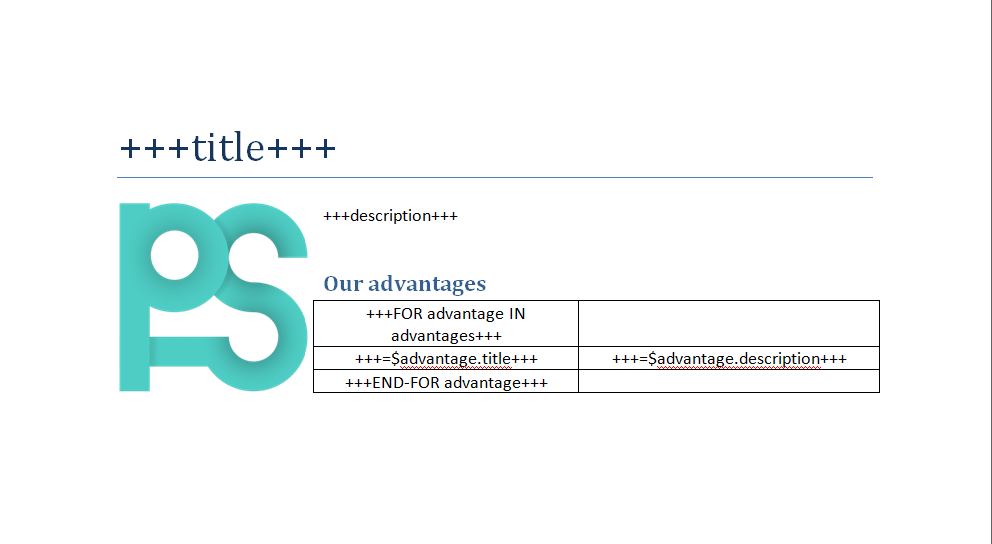
After processing, the placeholders are replaced with data and the document is returned as a PDF: